Communication is the heartbeat of every successful company. Whether you are a solo entrepreneur or managing a growing team, staying connected with customers is vital. One tool that has gained massive popularity is google voice for business. This smart phone system allows you to manage calls, texts, and voicemails through the cloud. It is designed to be simple, professional, and very easy to set up. In this guide, we will explore why so many people are using google voice for business to keep their work life organized. We will break down everything from the basic features to the advanced settings that help your brand look its best.
What is Google Voice for Business?
At its core, google voice for business is a virtual phone system that works over the internet. Unlike traditional landlines, it does not require heavy hardware or messy wires. You can take calls on your smartphone, tablet, or computer. This flexibility is perfect for modern teams who work from home or travel often. When you start using google voice for business, you get a dedicated work number. This means you do not have to give out your personal cell phone number to every client. It keeps your private life separate from your professional one, which is a big relief for many owners. It is a reliable and modern way to handle your daily conversations.
Google Voice for Business Pricing Explained
When choosing a new tool, the first thing most people ask about is the cost. The google voice for business pricing is divided into three main tiers: Starter, Standard, and Premier. Each level offers different features depending on how many employees you have. The Starter plan is great for small teams with up to ten people. The Standard and Premier plans are better for larger companies that need more support and advanced settings. Understanding how much is google voice for business depends on your specific needs. Most small businesses find that the entry-level plans are very affordable compared to old-school phone companies. It allows you to grow your communication system as your company gets bigger.
How Much is Google Voice for Business Monthly?
To give you a clear answer on how much is google voice for business, the prices usually start around $10 per user every month. For the Standard plan, you might look at $20 per user, and the Premier plan is around $30 per user. Keep in mind that you also need a Google Workspace subscription to use this service. This is because google voice for business is built to work perfectly with Gmail, Drive, and Calendar. When you add up the costs, it remains a very budget-friendly option for startups. You get a lot of value for a small monthly fee. It is much cheaper than buying expensive office phones and paying for professional installation services.
How to Use Google Voice for Business for Your Team
Learning how to use google voice for business is quite simple because the interface looks just like the apps you already use. Once you have your number, you can set up a “digital receptionist.” This is a voice that greets callers and asks them to press a number to reach the right department. This makes your small company feel like a big corporation. Another great way of using google voice for business is the “ring groups” feature. This allows multiple phones to ring at once when a customer calls. This way, someone on your team is always there to answer. It ensures you never miss an important opportunity or a happy customer’s question.
The Simple Steps for Using Google Voice for Business
If you are wondering how to use google voice for business daily, you just need the app on your phone. You can send professional text messages to clients right from the app. It also has a great feature that turns your voicemails into text. This means you can read your messages in a meeting instead of listening to them out loud. Google voice for business makes it easy to block unwanted spam calls too. This saves you time and lets you focus on the work that actually matters. The system is very intuitive, so you won’t need a manual to figure it out. Most people get the hang of it in just a few minutes of clicking around.
Setting Up Your Professional Number
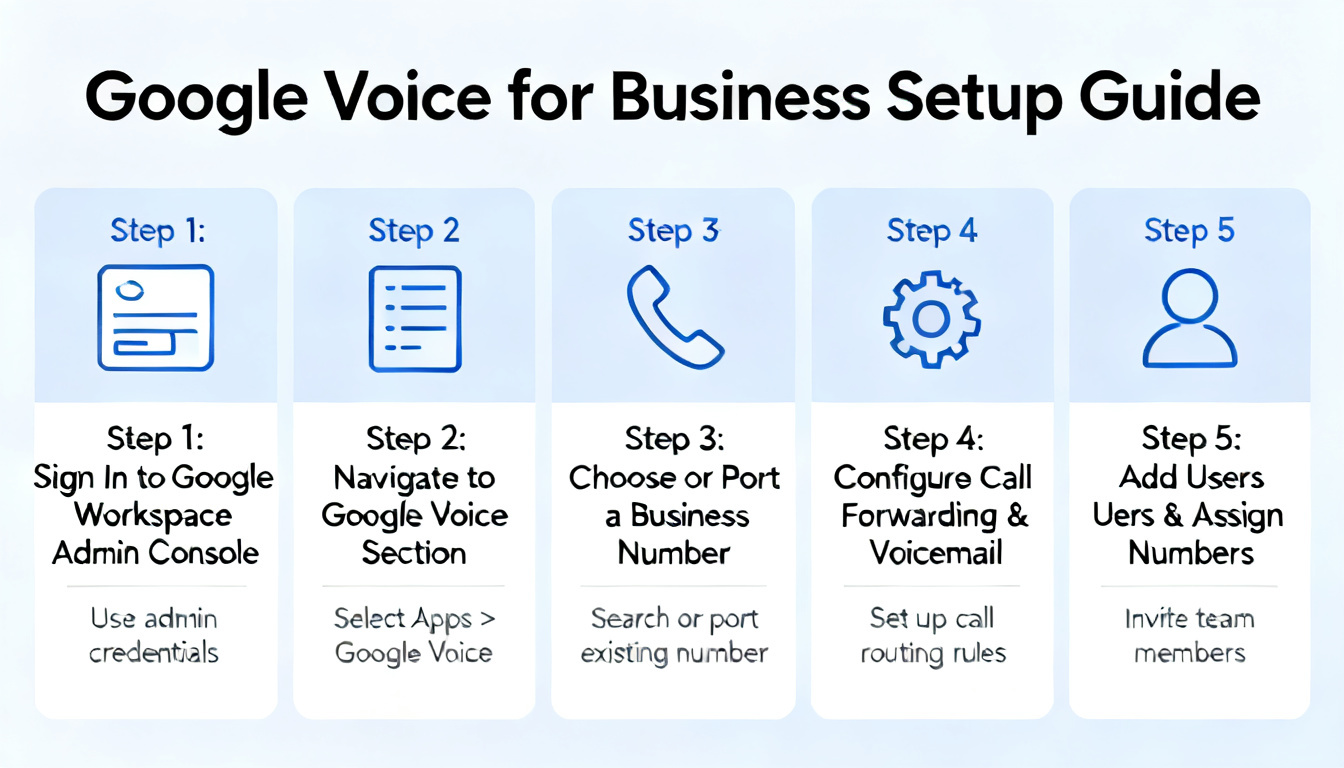
The setup process for google voice for business is very fast. You first log into your Google Workspace account and select the Voice icon. From there, you can choose a local area code for your business number. Having a local number builds trust with people in your community. If you prefer, you can even port over your existing number so you don’t have to change your business cards. After picking your number, google voice for business will guide you through the billing steps. Once that is done, you are ready to start making calls. It is a seamless process that doesn’t require a technician to visit your office. You have total control from your dashboard.
Why Choosing Google Voice for Business Saves Time
Time is money in the world of commerce. By using google voice for business, you stop wasting time on technical issues. Since it is a cloud-based system, Google handles all the updates and security. You don’t have to worry about your phone line going down during a storm. Also, google voice for business integrates with your Google Calendar. You can set it to “Do Not Disturb” automatically when you are in a meeting or after work hours. This helps you maintain a healthy work-life balance. Your phone won’t ring at dinner time, and callers will be sent to a professional voicemail. It is a smart way to manage your availability without being glued to your screen.
Comparing Google Voice for Business Pricing Plans
Let’s look closer at google voice for business pricing to see which one fits you. The Starter plan is perfect for freelancers who just need a professional line. The Standard plan adds the auto-attendant feature, which is great for small offices. If you have an international team, the Premier plan is the best choice. It offers advanced reporting so you can see how many calls your team is handling. No matter which plan you pick, google voice for business remains transparent with its costs. There are no hidden fees or long-term contracts that trap you. You can change your plan or cancel at any time if your business needs change. This flexibility is a huge advantage for new entrepreneurs.
Managing Calls with Google Voice for Business
When you are using google voice for business, you can easily transfer calls between team members. If a customer calls you but needs to talk to your assistant, you can send the call over with one click. This makes your internal communication very smooth. Google voice for business also keeps a record of all your calls and messages in one place. You can search your history just like you search your emails. This is helpful if you need to remember what a client said two weeks ago. It keeps your business records organized and easy to find. Everything is backed up in the cloud, so you never lose your important data.
Top Benefits of Using Google Voice for Business
One of the biggest wins with google voice for business is the professional image it provides. Even if you are working from your kitchen table, your callers hear a professional greeting. Another benefit is the cost savings. When you look at how much is google voice for business, it is clear that it saves hundreds of dollars compared to mobile carrier business plans. It also works on any device. You can start a call on your laptop and move it to your phone if you need to walk out the door. Google voice for business is truly built for the way people work today. It is mobile, flexible, and very reliable for everyday use.
Success with Google Voice for Business
To get the most out of google voice for business, make sure to record a very clear and friendly voicemail greeting. Use the mobile app so you can stay connected while on the go. Regularly check your call logs to see if you are missing any leads. By using google voice for business consistently, you create a reliable point of contact for your brand. This consistency helps build long-term relationships with your customers. They will know they can always reach you through your professional line. It is a small investment that leads to big professional results. Your business deserves a phone system that is as smart and hardworking as you are.
Summary of Business Insights
| Category | Details |
| Brand Name | Google Voice for Business |
| Best For | Startups, Freelancers, and Small to Mid-sized Teams |
| Starting Price | Approximately $10 per user / month |
| Top Feature | AI Voicemail Transcription & Auto-Attendant |
| Device Support | iOS, Android, Web Browser |
Conclusion
In conclusion, google voice for business is an excellent choice for anyone looking to professionalize their communication. It is affordable, easy to manage, and packed with features that help you stay organized. Whether you are worried about google voice for business pricing or just want to know how to use google voice for business, the answer is simple. It is a user-friendly tool that scales with you. Taking the step to separate your work and personal calls will save you a lot of stress. Give your business the voice it needs today and start using google voice for business to connect with the world!
(FAQs)
1. Can I use Google Voice for business for free?
While there is a personal version of Google Voice that is free, the professional google voice for business requires a paid subscription. This ensures you get better security, support, and features like the auto-attendant.
2. How much is google voice for business for a single user?
For one person, the cost starts at $10 per month for the Starter plan, plus your Google Workspace fee. It is a very cheap way to get a professional second number on your existing phone.
3. Is google voice for business pricing transparent?
Yes, the google voice for business pricing is very straightforward. You pay per user per month, and you can see exactly what features are included in each tier before you sign up.
4. Do I need special hardware for using google voice for business?
No, you do not need any special desk phones. You can use your current smartphone or computer. However, if you want desk phones, google voice for business supports certain models that work with the internet.
5. Can I have multiple numbers with google voice for business?
Yes, businesses can assign different numbers to different team members. This is managed easily through the Google Workspace admin console, making it simple to add or remove lines as your team changes.
6. Is it hard to learn how to use google voice for business?
Not at all! If you know how to use a smartphone or send an email, you already know how to use google voice for business. The app is clean and very easy to navigate for people of all tech levels.